Category: hardware

Fonera Router

hardware : by Tommy — April 12th 2007, 11:20PM
hardwareFonera RouterA while back, in the Forums, I made a post about getting a free Fonera router from Fon. There's been considerable buzz about these little routers and how quite a few people have been able to hack them.

Normally, the Fonera will be hooked up to provide a private wireless network for the owner and an open, albeit throttled, free wireless connection for those on the Fon wireless network. (The idea is to blanket the world with wireless - good idea, in theory. More about Fon on wikipedia.)

Early on Fon was dishing out modified Linksys WRT54G routers, but it was overkill for their intended purpose. Then came the Fonera, which is a tiny little one-port, one antenna router. Its like a travel size router and the antenna is about half the height of my WRT54G. The router's software tells it to "phone home" once it's found an internet connection to update any software. It also registers itself as part of the active Fon network. After grabbing the newest flash it becomes a bit more tricky to mod. ...I made sure not to plug mine in.

I found quite a few HOW-TOs, but some seemed to be dated or aimed at older firmwares. I received a rev 4 model. The mods include adding another antenna to doubling the internal ram from 16Mb to 32Mb (too much work). Both were a bit more than I cared to bother with. Instead I chose to install DD-WRT on the little box to match my other WRT54G.

The first step was to enable SSH access. This was done by way of this HOWTO.
Next, I needed to grab the DD-WRT files compressed for the Fonera's slim 16Mb, as well as a forged bootloader signature. I found all of this info at this other great tutorial. I followed the instructions word for word and it worked flawlessly. (No he didn't make any typos.)

I spent a while lurking alot of HOWTOs, but these two seemed to capture all of what I needed. It didn't take me long to enable SSH. Maybe about 20minutes from setting up a switch apart from my existing network, to logging into the shell and enabling the SSH daemon permanently. Flashing with DD-WRT took a little longer, but a bit of that is spent waiting as the little processor loads the new filesystem into memory. A great project to embark on if you have a Fonera and don't know what to do with it.

Cantenna w/ Funnel

hardware : by Tommy — April 4th 2007, 11:20PM
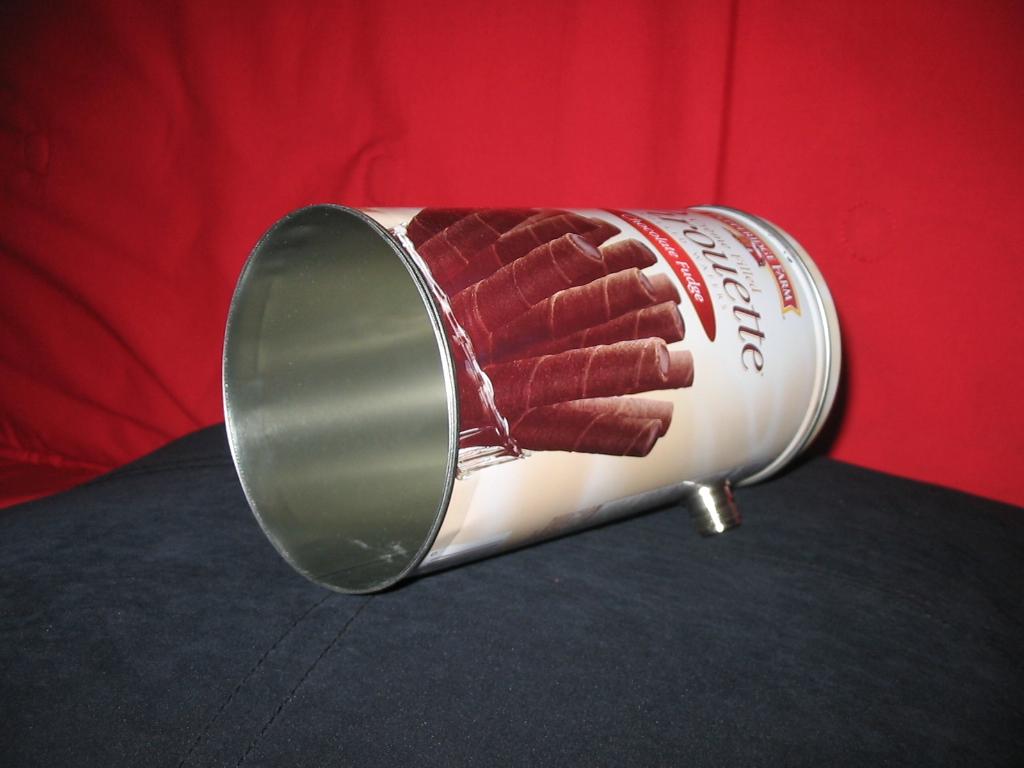
hardwareCantenna w/ FunnelFinally. Yes, I finally got around to making a cantenna. Years ago I read about the now famous Pringles Cantenna which I've always thought was a cool concept and has been something I've wanted to do. Now it's a bit of use to me since I enjoy using my laptop on the move using NetStumbler to locate open access points.

I began with a bit of reading and looking up what all is needed to construct a Pringles cantenna, and before long I learned that the Pringles isn't really the best way to go. Nope, instead I found that the Pringles design was out performed by a Cantenna made from a can of beef stew! Not only does it perform better, it's way easier to make. In fact, after buying the ready-made 1.21" radiating element from jefatech.com, this construction was probably the easiest project I've attempted. I found out that a large can of Dinty Moore is the same size as the "Nally's Beef Stew", so guess what I had for dinner one night? I cleaned out the can, and went to the machine lab the next day to use a drill press to pop a 5/8" hole for the N-connector. Took it home and tried it out. Wow! I went from seeing 1 AP (mine) to 20, just in my front yard. Not bad for just a can with a connector on it. I then took a stroll to see what the neighborhood has to offer and found an open Netgear access point. After zeroing in on the source, I found that it was about 120yds from my original location and across a street! (...and that was being able to use it, I was able to detect at a further distance.)

Fine and dandy, but the can just wasn't good enough on its own. I had to do more. I added a 6"-to-4" heat pipe coupler to the front end to funnel in more signal, which I had seen on a cantenna made from a Pirouette can. (Yeah, I made one of those too. Just today, in fact.) The funnel gave me a noticeable difference in signal strength when I'm at a distance. I think I remember seeing it jump about 3dB in signal strength after I slipped it on. (That's a doubling of power!)

In case you missed the links:
  • Here's the original can.
  • Here it is with the funnel (kinda looks like a flashlight)
  • Inside the cantenna (radiating element is about 1.21" long)
  • The new Pirouette model (yet to be field tested)

    Grendel sez: For those wanting to make one too, I just learned that the large 40oz can of Walmart brand ravioli comes in a similar can and it's a couple bucks cheaper. (guess it depends on how much you like beef stew vs. ravioli.)
    FYI - Can dimensions: 3.9" diameter, 6" long
  • New Keyboard

    hardware : by Tommy — November 10th 2006, 12:48PM
    hardwareFor the past 8 years or so, I've had a Digital (DEC) brand keyboard that I procured "off the tree" from PC Outlet when Skaven, Roboprobe and I all worked there. I think it was Roboprobe that got ahold of it for me. I've sincerely loved that little beige keyboard. It has been the one keyboard I've used with Windows 98 on my K6-2+, to my K6-2 400, leet linux-learning machine, on up to my current Athlon64. It's been around, and has nasty oil-spots to show for it. I've seen some grimey keyboards, and I've tried to keep this guy clean, but some nastiness just doesn't come out. It was the one old part of my computer that just didn't look good - at all.

    To match my sleek new monitor, I had to get a sleek, new keyboard. I wanted a black keyboard and I've always like the minimalist look of the Dell slim-line keyboards.

    I looked on ebay for a Dell SK-8115 and found several. I found some were selling for $3 + s/h. In the end, it all worked out to about $10 for a cool, simple, new keyboard. I know, not everyone likes them, but I really like the way the keys feel as you type, it also has very quiet keys and looks nice too. So far so good.

    Here's what the keyboard looks like.

    Grendel Goes Widescreen

    hardware : by Tommy — October 31st 2006, 02:34PM
    hardwareWell, after many years of faithful service, my trusty (crusty?) old 21" CRT gave up the ghost. I bought it several years ago from Valt, who found a business selling their used monitors on the cheap. (A 21" for $50?! How could I pass that up?)

    It served me well. My games were large, easy to see and I loved it. Writing programs with that much "real estate" was a breeze. At high resolutions, you can really open a bunch of windows and read them all.

    So, yesterday afternoon while watching "How It's Made" on Discovery Science Channel, my monitor made a quick popping noise like a racheting socket wrench does. The tube went dark and all was lost. I was relieved it was just the monitor, because from the sound of it, I thought my case fan had come loose and hit the motherboard somehow, shorting something out. So when I saw the system was fine, and the tube had gone out, I wasn't too peeved. (Besides the fact that I have a 17" CRT in the attic as a backup)

    So my monitor is out - what to do... I first got on my laptop and looked at Newegg. They had a sale on a Hanns-G, which Notorious had told me was nice. I was about to purchase that very monitor when I decided I should also see what deals were to be had at the local retailers. We first went to Best Buy, nothing to exciting there, but I did feel that 19" was just in my budget and I liked the size of it. We then went to Office Depot, again, nothing too exciting. Just as we were about to leave, I saw a Hanns-G that was on sale. It was the same 19" widescreen that I saw on Newegg for $190, and here it was in the store for $30 less (sans tax). Out of stock, but the price tag was pretty low. Oh well, it was worth a look. The sales guy told me to call back in the morning to see if they get any more in.

    This morning I called the store to see if they received any more stock, which they hadn't, and then I called the Tyler store. They did have the monitor in - last one. I told him to hold it and so between my morning classes I ran over to Tyler and got the last one. It looks wonderful - no glaring dead pixels. Widescreen is my new friend.

    m0n0wall And You: Die Harder

    hardware : by Corey — October 24th 2006, 12:11PM
    hardwareRecently, the router at the gym where I work out has been going on the fritz. It's a D-Link DI-524 so it stands to reason. As the local technology consultant for the gym, I convinced them to allow me to build a m0n0wall box for them.

    The issue is that the gym is a small private studio and they are trying very hard to make it look chic and fashionable. To me, this means that they'd rather not have a honking Dell Optiplex G1 like the unit I built a few months ago. I found a solution over in SA's SH/SC forum: The IBM NetVista N2800 8364 Thin Client.

    In the thread, a guy from England discussed how he made his unit work. His site has a good write-up on how to accomplish it, including this image where he outlines what is what inside the case. I picked up an 8364 off eBay for $55 shipped.

    Dealing with the two BIOS flavors can be a bit daunting if you're not experienced in editing BIOS settings so if you attempt to do this, please make sure you're not dumb. But even if you are, there is a PWD_RST jumper that will restore everything back to the land of lollypops and bikinis.

    The issue I'm having at the moment is one that apparently plagues the Ethernet models of the 8364. During the Linux boot process, the screen becomes garbled and the machine eventually locks. As recommended on the aforementioned page, enabling the on-board Ethernet controller seems to solve this problem.

    While that was well and fine, a new problem that is undocumented as far as I can tell has emerged. The keyboard I am using to assign interfaces as well as the LAN IP address is not functioning correctly when attached to the thin client. The same keyboard works fine on my server so I know the keyboard is not the issue. Strange characters are entered for every keystroke and always entered twice. It's the oddest thing I've seen in a while. If anyone has any ideas how to work around this, please leave a comment. I'll post an update when I get it resolved.

    Now, what did I do with that USB keyboard...