Author: Tommy

Programming Challenge 2

programming : by Tommy — February 23rd 2011, 10:16PM
programmingOk programmers and code monkeys, it's time for Programming Challenge 2. Nothing overly complicated this time. I was just messing around and thought you'd like this quick little brain teaser.
It's a "just for fun" challenge. Choose your favorite language for this one. Here it goes:

Part A: Display/print a vertical sin wave using * characters.
Part B: Display same sin wave horizontally using * characters.

Part A should get you going in the right direction (esp. if you've never played with the sin functions in your language), but Part B is a bit more tricky. No graphics libraries, cheater.

Post source in comments (must be logged in to comment).

Winner to receive 1 small shot of self satisfaction of completing trivial problem through useless challenge on obscure blog.

HOWTO: Working FM Ham Satellites

radio : by Tommy — January 22nd 2011, 03:37PM
radioA local ham recently asked me the best way to talk on ham radio satellites using what he already has on hand. It doesn't take much, although some more specialized equipment does make it much easier, but the point is - you don't need much beyond what you may already own if you have a basic VHF/UHF station. The following is my email to him:

Which birds to target and how to track them
"The best satellites to start with are AO-27, AO-Echo and SaudiSat-1C. (Satellites go by different names depending on where you're getting your info.)

I usually direct people to Heavens-Above to get the latest pass information. The exact time and angle of each pass varies from day to day, so you either need tracking software or a website to tell you when the next pass is over your location. With Heavens Above, you need to enter your longitude and latitude, so it can figure out the information for you.

I've put in the longitude and latitude in for my QTH here in Longview on this link:
http://www.heavens-above.com/main.aspx?Lat=32.5560&Lng=-94.7474&Alt=365&Loc=N5DUX&TZ=CST
(change the location by editing the link or click on the link under Configuration at the top of the page)

When you go to the website, you'll be shown a lot of different links. For our purposes, we're interested in "Radio Amateur Satellites". Click on that link.

Now you'll be presented a table of all the various satellites that Heavens Above is tracking. I usually find the satellites I'm interested in working, then look over at the "maximum elevation" - this is how high in the sky the "bird" will get. Generally the higher the pass, the better chance of hitting the satellite you'll have. If all you're using is a vertical, 45-degree passes will give you a good shot. But anything greater than 30-degrees should be doable. Because you're not on a directional antenna, you don't need to really worry about the azimuth of the pass. Someday, you may find that you'd like to get a yagi and then direction of the pass will matter.

(edit: Heavens-Above is a good reference, but since most people have to jump through a few hoops to enter their Longitude and Latitude, I've been recommending N2YO more and more. Heavens-Above will show a good table of information so you can see everything at a glance, but if you know the satellites you're wanting to work, check out the table at N2YO's Amateur Satellite listing.)

What frequency?
So, now you know when the passes are occurring, now you need to set the frequency. Here are the uplink and downlink frequencies for these 3 satellites. Note the tone. Remember, you talk on the uplink, receive on the downlink.

nameuplinkdownlinkPL
AO-Echo145.880435.150-
AO-27145.850436.795-
SaudiSat-1C145.850436.79567.0
Int'l Space Sation144.490145.800-

Doppler
Ok, so there are your frequencies. Those are the "actual" frequencies. Remember, Doppler shift does play a part in satellite communications. You will need to go UP a few kHz as the satellite is coming TOWARD you and DOWN a few kHz as it goes past you. (When it is perpendicular to your position, the frequency will be right on the actual frequency.) If that makes your head hurt, just know to start about 15-20kHz above the actual. As the signal gets more "scratchy" sounding, you'll know it's time to drop ~5kHz.

Listen first!
Listen, listen, listen. Just because you can't hear it, doesn't mean it can't hear you! It's a repeater in many respects, and if you're calling and calling and calling, you're tying it up so others can't use it. If you plan to operate chiefly during daytime hours, you'll hear A LOT of guys crowding onto the satellite each pass. You'll hear quick, rapid-fire exchanges. "N5DUX Echo Mike-22" "Ok, N5DUX, EM22 - this is W1AW, FN31" "Roger W1AW, FN31, 73." - and that's all it is usually. A quick exchange of grid squares, seldom a signal report and rarely much conversation. That is, during the day. At night it's a different story. When all the "sane" people are asleep, you can get on an FM satellite and have a full QSO for the duration of the pass, sometimes up to 15 minutes - always remember though, you have an entire continent of hams that may be wanting on the satellite too, so keep some space between exchanges.

So, tune your radio to the downlink frequency, find the next pass and see if you can hear the satellite.

Recording
A tip I've picked up along the way: The operators are going to be throwing out their info very quickly, so you may need to make a recording of the pass, so you can go back and replay the whole thing to get a second chance of copying their info.

Once you know you can hear the signals, throw out your callsign and see if someone comes back. It's just a really busy repeater, so don't give up. Also, realize that since you're only using a vertical, you won't have as strong of a signal as others will, so you may get stepped on or not heard. Don't give up - try later in the evening when not many are on.

CW telemetry
If you have a dual-band antenna, that would be even better for working sats from a vertical. A mono-band 70cm will work fine for receiving, but for transmitting the uplink you'll need a resonant antenna on 2m.

That's not to say you can't have fun with the 70cm alone. If you have a multimode 70cm radio, you can also copy telemetry data from other satellites that is sent down in CW. It's not the most exciting stuff right away, but copy one satellite over a period of a few days and you can monitor how it's on board temperature swings as it passes in/out of the sun/earth's shadow and stuff like that. It's just fun to copy CW from a little satellite 200+ miles away. The one I copy most often (when I do try to copy) is RS-30 Yubileiny. Unfortunately it isn't tracked on Heaven-Above, so I have to use this other website that's pretty handy, N2YO.com
Yubileiny's track: http://www.n2yo.com/?s=32953

After you decode the info, check out how to "decode" the info by Googling for "RS-30 telemetry", or use a tool like those found here for free: http://www.dk3wn.info/software.shtml Check out the telemetry hypothesis section here to decode the seemingly random strings of info: http://www.ne.jp/asahi/hamradio/je9pel/yubilein.htm

So there you have it, a beginner's guide to getting on the birds with stuff you probably already have. For further reading, check out this page from AMSAT and, of course, scour Google for all it's worth!

update: It should be noted that as of sometime in Spring 2011, AO-Echo began experiencing difficulties with its onboard batteries. The command team cannot keep the control system loaded effectively taking AO-Echo offline. AO Echo is as good as dead until further notice.

update #2: AO-Echo is back online now. Thanks for the heads up Schrockwell. Echo is online running at 2/3 her input power and running 1W output. Note the changed frequencies. These are not the same frequencies Echo has been using since launch. There are the "QRP" frequencies.

update #3: AO-Echo is dead, so long little guy.

Morse Code: A Brief History

radio : by Tommy — October 18th 2010, 10:12PM
radioMost people know the important life-saving phrase Di-di-dit da-da-dah di-di-dit (SOS), but that's about it when it comes to Morse Code. Many people know that Morse Code was named after its inventor, Samuel Morse but not much more. Fewer people know that the use of Morse Code still persists (unless, of course, you know someone that uses it on a semi-regular basis!).

Morse Code is the oldest form of telecommunication still in use. It got its start when the legendary Samuel F. B. Morse, an artist by trade, began to experiment with methods to communicate via the relatively new field of electricity. Morse's system of communication was not the first form of telegraphy, nor was his invention the only electric telegraph. But he did invent a language of dits and dahs that, by way of a few revisions, remains in use to this day. (The history of the telegraph, interesting in its own right, is beyond the scope of this outline.)

Ham radio operators are perhaps the most notorious users of this antiquated form of communication, but not the only users. Navy signalmen use Morse Code when manning the Signal Lamp and aviators make use of the Code as a way of identifying directional beacons.

Morse Code has undergone few revisions since its inception. Morse's original code was a bit cumbersome, but the idea was there and several letters have remained unchanged. Morse originally planned the letters to leave imprints on a printed tape, but over time the code was learned by operators and the incoming signal was able to be decoded by ear rather than on paper. In order to speed up transmission, Morse gave the most frequently used letters the shortest signals. (E gets a single ‘dit’ and T gets a single ‘dah’) Identifying the most frequently used letters, Morse counted letters in a copy of the newspaper. The letters with the highest count were most used. Perhaps not the most technical method of finding the letters, but it was an easy and straight forward approach and has proven its validity. These most-used letters are some of the letters that have never changed.

As Morse’s Code and the use of the telegraph grew, operators using the code found ways to improve the characters’ codes. Due to some spacing issues, some letters were slowing down transmission speeds and/or confusing the receiver. (Some letters required a “space” or pause in the middle of the letter rather than sending a continuous series of dits or dahs. A resulting “space” between letters could then be misconstrued as a different letter altogether and throw off the transcription of the message.)

Morse made his code public in 1844. After a few years of use, Freidrich Gerke released his “improved” code alphabet in 1848 which came to be known as the Continental code. Gerke essentially removed the aforementioned spacing errors eliminating much of the confusion for telegraph operators. Finally in 1865, the International Telegraphy Congress standardized the code to form what is now known as the International Morse Code.

Once the International Code was in place, it has not changed in the nearly 150 years since. Telecommunications has changed completely transformed the way mankind communicates. The advent of radio ushered in easy-to-establish distance communications that required no connecting lines like that of the telegraph, yet the code did not change. Even in the advent of digital communications, the code remained a fixture in the telecommunication industry. It was not until the later 1990’s that the international community began reevaluating the use of the code. Mariners, aviators and radio operators worldwide needed to be proficient in Morse Code to perform their duties, but all this changed in the past 10 years. In spite of its fall from common usage, code operators of today would have no trouble communicating with telegraph operators of the railroad era via the code. No other form of communication can boast a 150 year heritage.

In radio communications, Morse Code continues to be a form of signaling that prevails when almost no other form of communication can get out. No other form of communication can go further on the same amount of radiated power. No other form of radio communication is easier to construct circuitry for. It is simple and efficient.

For those curious individuals wanting to hear Morse Code in use, YouTube offers a wide variety of operators making contacts, there’s the famed Tonight Show video showing the text message versus Morse Code race, and there’s always the ham radio bands.
I was unable to ever make real contacts in Morse Code until I discovered the 7.100-7.125 portion of the 40m ham band. For those looking to break into the world of CW operation, tune your dials to the Novice portion of the band and you’ll find other code operators that welcome “slow-code” newcomers.

Continue Reading...

neodux : by Tommy — August 15th 2010, 11:00PM
neoduxAfter the success of the DUX Yagi-Uda post and it finding its way to Hack-A-Day, I decided I should probably go in to more detail with each blog entry when I'm attempting to explain something technical.

In the past, I've tried be as succinct and just-the-fact-ma'am as I can so the article doesn't make the main page a mile long. I always assumed if you wanted to know more you could just ask me. But, more often than not, I ended up with an article that I think was too shallow or too "in-passing". So, for the sake of those that don't know me personally and would like more information, and in keeping with the spirit of information exchange on the web, I think it's best if I link to and explain all relevant information. To keep the main page short I've decided to limit the amount of words in a story that gets shown at a glance.
I've broken up the links to have the "Continue reading..." link on each article if it is longer than a preset length.

I'd really like to know what my core users think of this change. Is it for the better? Should I change the wording of the link? Should I display all information, longer or shorter at-a-glance summaries? You tell me.

DUX Homebrew Arrow Yagi

radio : by Tommy — August 7th 2010, 11:36PM
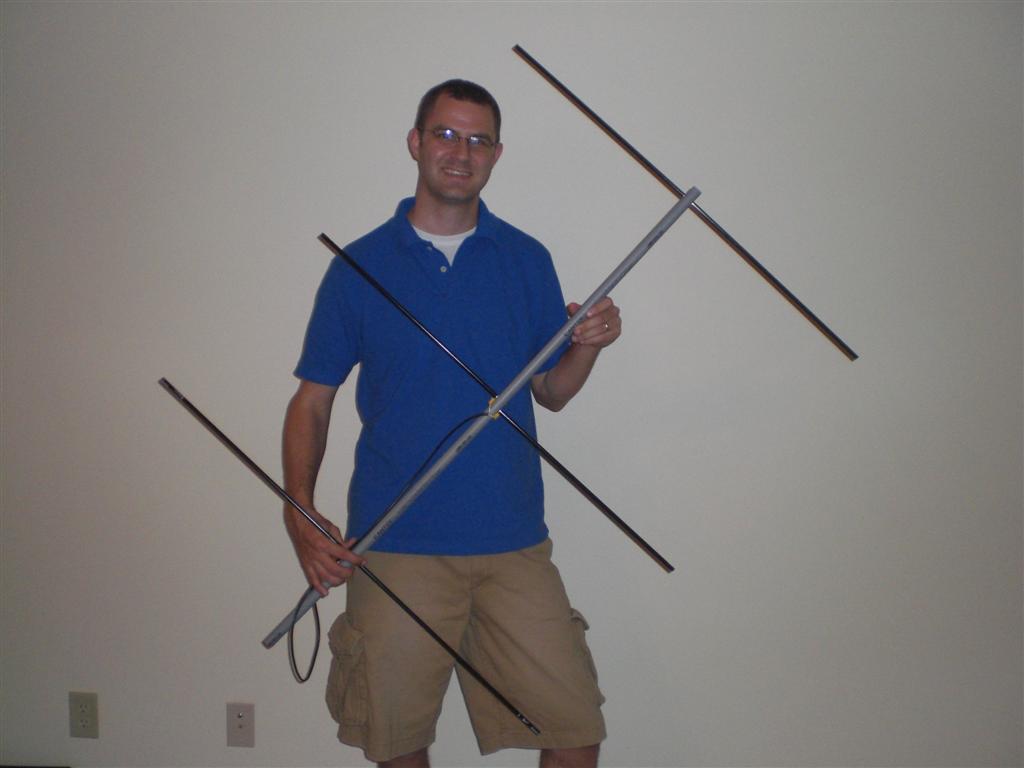
radioDUX Homebrew Arrow YagiThis summer I attended the TI-2 Space workshop put on by the ARRL and DARA in Dayton, OH. We spent 4 days learning how to make contacts with orbiting satellites like AO-27, AO-51 and the International Space Station, just to name a few. The antenna we used was the dual-band Arrow II Antenna. I've owned one for years and really like it. I wish more people had them, but I think most people think spending $140 for an antenna that can only handle 10W is a bit much.

My aim was to make a cheap alternative to the Arrow that is easy to break down for transport and storage. I really like the idea of using aluminum arrow shafts for elements; they are lightweight, straight, weather resistant, and fairly inexpensive. Another nice feature is the #8-32 threaded insert for broad heads that almost every arrow comes with.

I spent a couple of hours reviewing all the "cheap" and "ugly" yagi designs, as well as others like the "tape measure" and even a new-to-me "backpacker" design. They each have their own advantages and loyal followers.

I finally based my antenna design on one found in the ARRL Handbook from 1999. While not an exact replica, my design is very similar. I had decided to go with the through-boom design like the Arrow, as opposed to side-mounted because it is, in my opinion, cheaper. After buying 6 arrows and a quick trip to Lowe's I had a length of #8-32 all-thread and a piece of 3/4" conduit to use as the boom. I marked a straight line down the center of the boom to give me a point of reference, measured out the spacing holes, made sure I was drilling square and level and got to work. After the 3 holes were drilled, I cut 2.5" lengths of all thread for the director and reflector. Since I was going with the split driven element design of the IDX yagi, I would not need threading for the Driven Element, I'd use machine screws for that. Originally I planned to use nylon 8-32 all-thread to go through the boom for the driven element, and feed each side independently similar to the Tape Measure Yagi, but I couldn't find nylon all-thread, and the longest nylon screws to be found came up an inch too short.

I cut a length of RG-58 cable and soldered on two o-ring connectors to slip over the machine screws before screwing on an arrow.
Lastly I cut each arrow to the appropriate length, which worked out to:
- 19 5/8" for each Reflector arrow
- 18 1/8" for each Driven arrow
- 17 1/8" for each Director arrow
The measurements came from IDX's lengths, subtracting 3/4" (for the boom) and then divided by 2 to give me the necessary length for each arrow.
I used a cutoff wheel and my air compressor to cut the arrows to length instead of a hacksaw. The cutoff wheel leaves a clean cut as opposed to sawing.

After putting my MFJ-269 analyzer on the yagi, I found the lowest SWR to be about 1.4 right around the target frequency of 144.490 MHz. Not too shabby for a first yagi.
For those taking my lead, I found it helpful to feed the yagi as perpendicular to the boom as possible. It is also somewhat important for the O-ring feedline connectors to be on the same side of the boom as the arrow.

Here's a pic of me holding the 2m yagi. It's a bit larger than the commercially made Arrow.

update: I've been asked by more than one person why the split driven element. As you read above, it was semi forced on me by necessity. I needed it to be split for mechanical reasons. the screws going through the boom serve as a match, negating the need for the "hairpin" match from the tape measure yagi or a gamma match. The driven elements being split probably do affect the radiation pattern in the long-field, but perhaps only skew the pattern more in one direction.
(TLDR: it's easier that way and it just works!)

update #2: Hello Hack-A-Day! Yes, you can talk to the space station and many other amateur radio satellites.
update #3: Okay, for those that are interested, I'll be putting together kits if you want. Price to be determined based on what you want/need. You can email me at tommy@neodux.com for more info.